Invite by resume upload (Profile Screening & Resume Scoring)
Use this option when you have resumes (PDF/DOC/DOCX) and want CoderScout to shortlist candidates automatically before they enter the assessment.
This flow is typically used when your Assessment includes a Profile Screening stage.
What you can do
- Upload multiple resumes (or a ZIP of resumes).
- Select resumes from existing Resume Pools.
- Score resumes against your job requirements.
- Invite candidates above a cutoff to start the assessment.
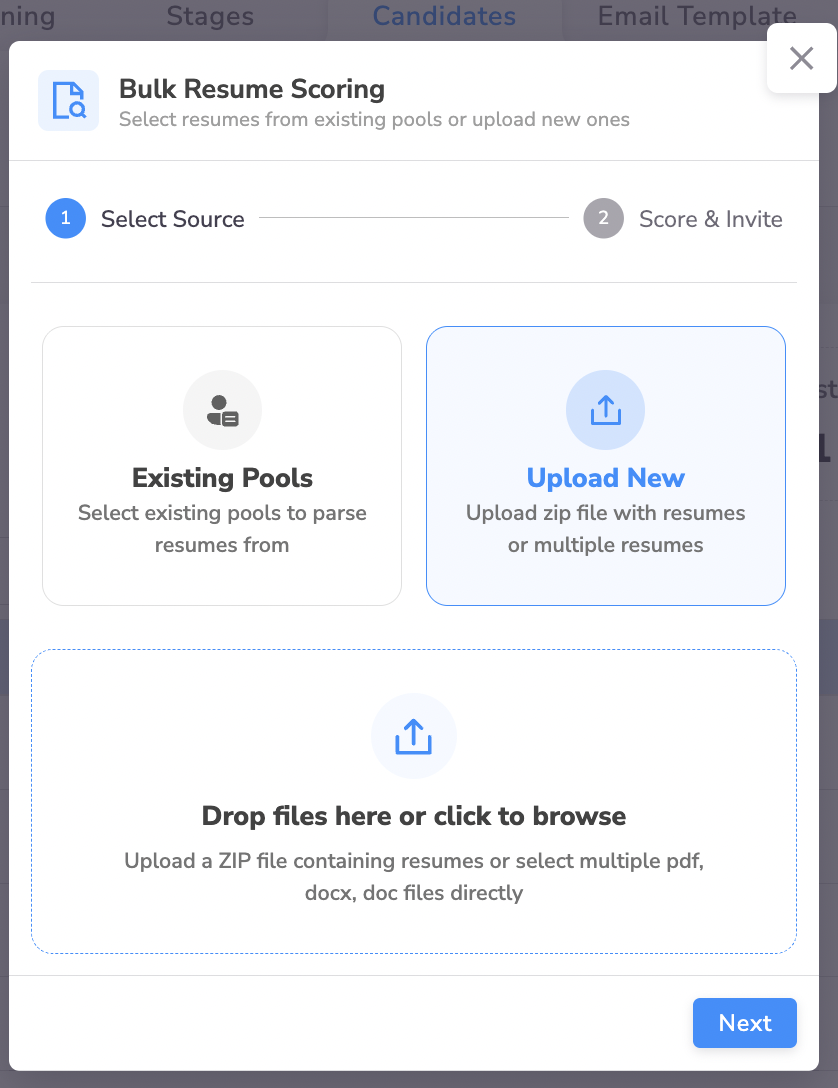
How it works (2-step flow)
Step 1: Select source
You can choose:
- Existing Pools: select one or more resume pools already available in your organization.
- Upload New: upload a ZIP containing resumes, or select multiple resume files directly.
Step 2: Score & invite
- Configure the scoring criteria (based on the job role requirements).
- Run scoring to generate a ranked list.
- Choose a cutoff score.
- Invite shortlisted candidates to the assessment.
Uploading resumes (recommended formats)
- DOC
- DOCX
- ZIP containing the above
What happens after inviting
- Invited candidates receive the standard assessment invite email.
- If system checks are enabled, candidates must complete them before entering stages.
- Recruiters can override decisions later (invite borderline candidates, reject false positives).
Tips for better resume scoring
- Keep criteria measurable (years of experience, specific frameworks, cloud exposure, databases).
- Assign higher weight to must-have skills.
- Don’t overfit the criteria—leave room for strong generalists.
Common issues
- Resumes fail to parse: Ensure the file isn’t password-protected or scanned-only without selectable text.
- Scoring feels off: Tighten criteria phrasing, add weightages, and remove vague requirements.
- Too many shortlisted: Raise cutoff score or add 1–2 non-negotiable criteria.
Recommended next steps
- After candidates enter the assessment, use Let the Assessment Run on Auto‑Pilot to automatically progress qualified candidates through stages.
- Use Track & Review Candidate Performance to shortlist for your human-led interview.